


How We Use AI Agents to Migrate WordPress Sites to Webflow (Without Losing Content or Rankings)
Find out how to improve your conversions in days not months.
Key Takeaways
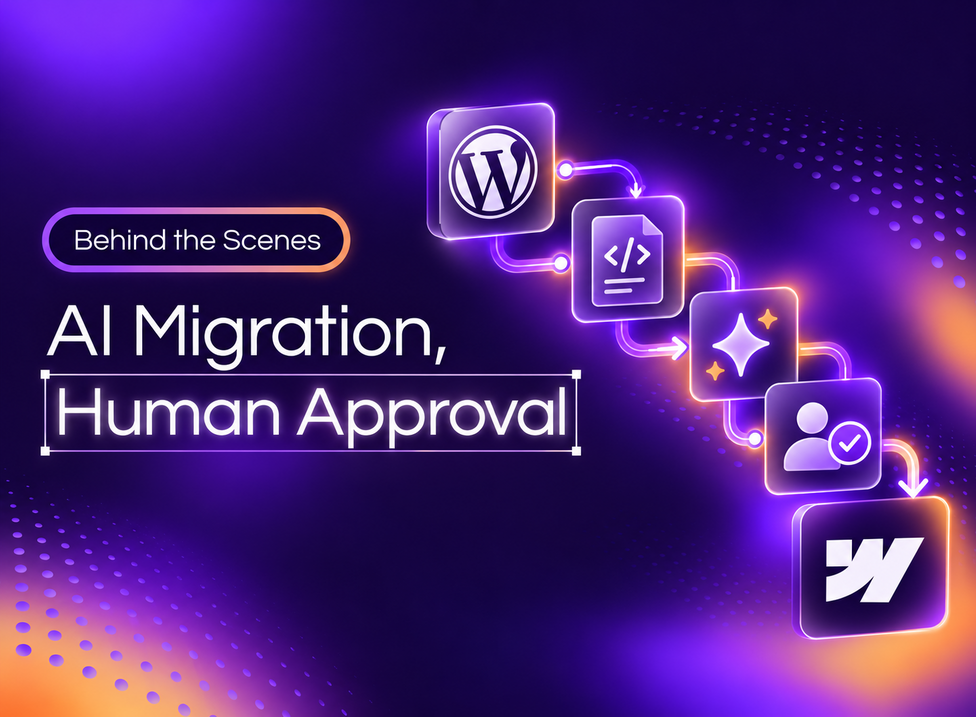
In an AI website migration, AI agents do the repetitive work of moving content from one platform to another. In our WordPress to Webflow migrations, scripts pull and compare every post, an AI agent runs the steps and fixes what doesn't match, and a person approves each step before anything goes live.
Buyers ask us a fair question: if AI can migrate a website, why hire an agency? AI makes the move faster. It also misses problems it hasn't been taught to look for, and those problems cost rankings. We built our process around that gap.
Can AI Migrate a WordPress Site on Its Own?
AI can do much of the work in a WordPress migration, but it can't own the result. AI agents can convert a WordPress export, draft the fields for the Webflow CMS, move posts into Webflow, and compare old pages with new ones. They make mistakes when the data is messy, and WordPress data usually is.
Webflow has published a case study in which one B2B company moved a 10-year-old WordPress site with an AI assistant and the Webflow MCP, the connection that lets AI tools work inside Webflow. The new site went live 3.5 weeks after the company signed with Webflow.
People on their team still gave final approval on content before anything went live.
That matches what we see on our own website migration projects. AI speeds up the move. The risk sits in the details the AI doesn't know to check.
Why WordPress Migrations Take So Long
WordPress sites store content in many places, and each one needs a decision. As our lead developer puts it, “Data can be in any shape and form, and we need to figure out a way to actually move that over.”
These are the problems we plan for on every WordPress migration:
- Custom fields. Many posts carry fields a developer added years ago. Each one needs a matching field in the Webflow CMS.
- SEO plugin data. Titles and meta descriptions often live in a plugin such as Yoast, outside the post itself.
- Tables and plugin content. Tables, shortcodes, and content made by plugins don't come through the export the way they look on the page.
- Images and video. Images stay linked to the old WordPress server until someone uploads them to Webflow. Videos hosted in WordPress need a new home.
- Headings. Heading levels from the old theme may not fit the new design.
- Special characters. Quotes, accents, and symbols can break the CSV file the Webflow CMS imports.
Some exported data isn't needed at all, because Webflow already handles it. And if a post that ranks doesn't come through exactly, the site loses traffic on top of the dip any move causes.
How Our AI Migration Process Works
Our process splits the work three ways. Scripts handle anything that must give the same result every time, an AI agent runs the steps and fixes problems, and a person approves the result.
Scripts Pull and Compare the Data
Pulling data from WordPress and comparing the old site with the new one both run as scripts. The AI agent runs those scripts in order and works with what they return, so every count comes from the data. “Places where it could go crazy and invent numbers, that won't happen, because the numbers came from the script,” our lead developer says.
The AI Agent Fixes What Doesn't Match
The agent reads the script results, fixes the problems it finds, and runs the comparison again. It repeats until the difference between the WordPress site and the Webflow site is close to zero. It can also open both versions of a page in a browser and compare them visually or through the code.
A Person Approves a Sample Before the Rest Moves
Before the full library moves, the agent migrates a sample of posts [CURIO TO CONFIRM: sample size, 10 to 20 posts per the interview]. A person reviews the sample and approves it, and only then does the rest of the content move. “It's really important for us to have a human gate in every step,” says our lead developer.
A Lessons File Stops Repeat Mistakes
When something breaks, we write it down as a lesson, for example “re-host images on the Webflow CDN.” Every run checks the lessons file first, so the same mistake doesn't happen twice. Each migration starts with what the last one taught us.
We've used this process on four client migrations so far. When those projects hit problems, the problems came from other parts of the project, not from the migration process.
What Still Needs Migration Expertise
AI handles the volume. People decide what the site should be after the move, and they check the parts an AI agent can't judge:
- The design and build. AI can't turn a WordPress theme into a Webflow site. Our Webflow development team builds the pages from a component system your marketing team can edit.
- Webflow's quirks. Webflow has behaviors an AI agent doesn't know until someone teaches it. A dropdown, for example, can need an extra class to work on mobile.
- SEO decisions. Which URLs change, where each redirect points, and which pages get merged are judgment calls. Our website migration checklist lists every one.
- Tracking and forms. A person maps the Google Tag Manager tags, conversion events, and CRM connections, then tests them before launch.
“We have the expertise. We can build tools, agents, and plugins that replicate our work, but we still need the knowledge: what breaks, how it breaks, when it breaks,” our lead developer says.
If you're planning a WordPress migration and want to see how this process would work on your site, we can walk you through it.
What an AI-Assisted Migration Means for Your Team
For a B2B team, AI-assisted migration means a large content library can move faster and with fewer copy-and-paste errors, with a person approving each step. Timeline and cost still depend on the number of URLs, how much content moves, and whether the move includes a redesign.
Our WordPress to Webflow migration page covers how we run the full move, from the first crawl to the 30-day check after launch.
To plan the work and the owners for each phase, start with our website migration plan template.
And if your site runs on HubSpot CMS instead, read our HubSpot to Webflow migration guide.
For moves from any other platform, our website migration services use the same mix of scripts, AI agents, and human approval.
Frequently Asked Questions About AI Website Migration
Can AI migrate a WordPress site to Webflow?
AI can do much of the work: converting the WordPress export, mapping fields to the Webflow CMS, moving posts, and comparing old pages with new ones. It can't rebuild your design or make SEO decisions on its own. We use AI agents for the volume, and a person approves every step before launch.
Is an AI website migration safe for SEO?
It is when the AI works from a full list of URLs and a person checks the results. We map every old URL to a new one with a 301 redirect, carry over SEO fields, and compare old and new pages before launch. After launch, we track Search Console against the baseline for 30 days.
What does AI get wrong in a WordPress migration?
AI misses what it hasn't been taught. Common problems are custom fields with no matching Webflow field, SEO data stored in plugins, tables that break in the export, images still linked to the old server, and special characters that break the import file. A lessons file and human review catch these.
Does AI make a website migration faster?
Yes, for the content move. Scripts and AI agents move and check a large library much faster than copying posts by hand. The design build, redirect planning, and testing still take time, so the timeline depends on the number of URLs, the amount of content, and whether the move includes a redesign.
Will a person check our content before it goes live?
Yes. Before the full library moves, a person reviews a sample of migrated posts and approves it. A person also signs off on the redirect map, the tracking setup, and the finished site before launch. AI does the repetitive work, and people approve the result.
What's next?


Lucas is Development Team Lead at Curio Digital. Self-taught from childhood and building in Webflow since 19, he now leads the team shipping enterprise work for US clients. His focus: process and technical oversight that keep quality steady as volume grows.